1. The '@Sketch' Revolution: Beyond Text-Centric Prompts
For years, creators have wrestled with the inherent ambiguity of text-to-image prompts. Describing precise physical proportions, furniture layouts, camera perspectives, or exact clothing seams using adjectives alone frequently resulted in frustrating prompt roulette.
With ChatGPT Image 2.5, OpenAI bridges the gap between text and spatial intent. By typing @Sketch directly into the conversation box, users summon an interactive in-chat drawing canvas. You can sketch a rough room blueprint, trace out furniture placement, outline character postures, or map architectural horizons, then prompt: "Turn this into a photorealistic mid-century modern loft at golden hour."
Crucially, users do not need artistic drafting ability. The model's spatial reasoning engine translates crude outlines and compositional doodles into balanced, high-resolution compositions while honoring the user's intended layout down to the pixel.
ChatGPT Images 2.5 is here with major upgrades to image generation speed and editing precision, plus a new feature called Sketch.
— OpenAI (@OpenAI) September 8, 2026
Try it now in ChatGPT across desktop, mobile, and web. pic.twitter.com/Xz9k56z6hM
2. Surgical Image Editing & Reference Preservation
Prior diffusion models suffered from severe "editing drift"—modifying a minor detail like changing a shirt color often destroyed facial identity, warped background architecture, or altered lighting geometry.
ChatGPT Image 2.5 radically enhances multi-turn conversational editing. Users can point, lasso, or specify exact sub-regions of an image to modify. You can alter a model's jacket or swap out a coffee mug on a desk while the rest of the composition, lighting, and textures remain locked in place.
Furthermore, reference preservation has reached production standards: when an input photo of a person or physical product is supplied, ChatGPT Image 2.5 seamlessly inserts them into fresh backgrounds and styles while preserving facial identity, skin subsurface scattering, specular reflections, and brand contours without uncanny artifacts.
3. 50% Speed Reduction & Dual Architectures: Flare vs. Sunburst
Latency has been halved compared to the previous Image 2.0 baseline. To serve both high-velocity commercial applications and fine-art studios, OpenAI launched two distinct API models:
GPT-Image-2.5 Flare
Engineered for real-time throughput with 50% lower generation latency. Tailored for enterprise social media workflows, high-volume e-commerce catalogs, and dynamic visual search interfaces.
GPT-Image-2.5 Sunburst
Engineered for maximum artistic precision and fine-grain prompt adherence. Supports custom resolutions up to 4K and multiple quality brackets (low to max) for creative agencies and film concept artists.
4. Sweeping the Arena Text-to-Image Leaderboards
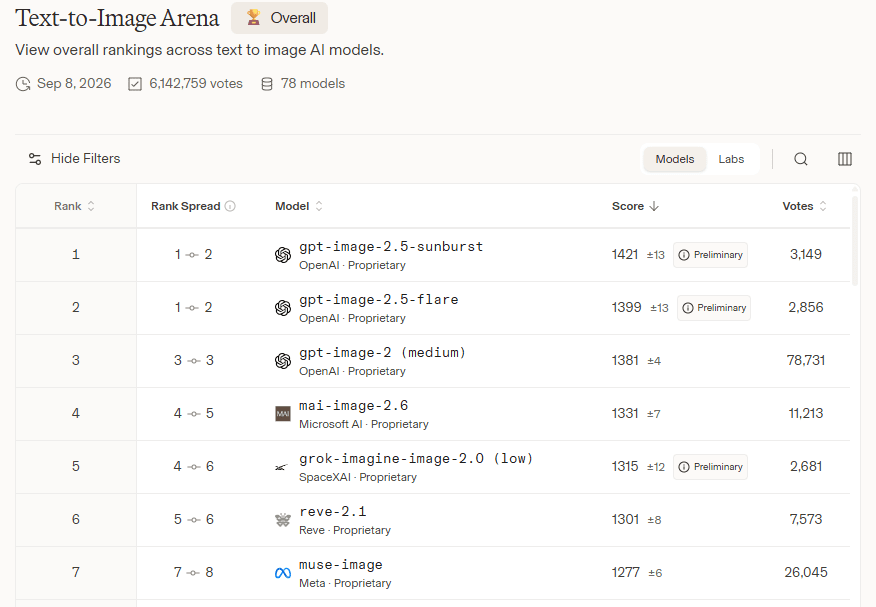
The performance gains translated immediately to public benchmark dominance. In the independent LMSYS Arena Text-to-Image and Image Edit evaluations, OpenAI achieved a decisive sweep:
- Rank #1: GPT-Image-2.5 Sunburst
- Rank #2: GPT-Image-2.5 Flare
Human preference raters overwhelmingly favored Image 2.5's photorealism, typography rendering, and strict adherence to negative constraints over competitive closed and open-weight diffusion systems.
5. OpenAI's Official Image Prompting Checklist
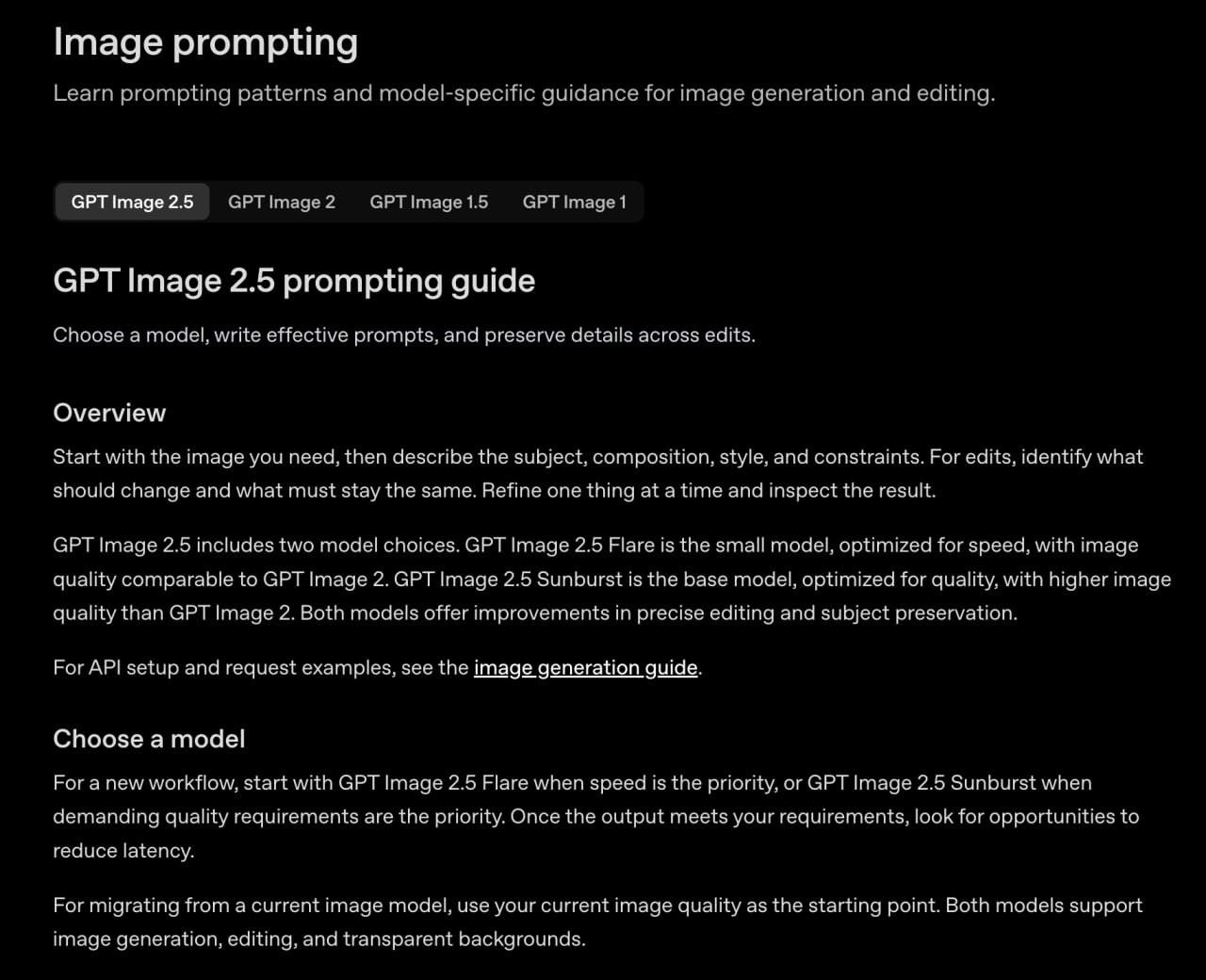
Alongside the model release, OpenAI published an official prompt engineering playbook to help creators achieve reproducible outputs without brute-force generation:
Official 5-Stage Prompt Formula
- Desired Outcome: Declare the visual medium first (e.g. macro editorial photo, oil on canvas, 3D clay render).
- Primary Subject: Explicitly describe character, anatomy, expression, and garments.
- Composition & Spatial Framing: Camera angle (e.g., eye-level 50mm, wide-angle bird's eye), rule of thirds, depth of field.
- Style & Lighting: Golden hour, Rembrandt sidelight, Kodak Portra grain, or volumetric haze.
- Constraints & Negative Anchors: Specify exact typography in quotation marks along with exact elements to exclude.
For complex scenes, OpenAI recommends specifying the scene, subject, details, and constraints separately. When including text, specify the exact phrase in quotation marks, along with its placement and font appearance.
When editing, it is best to change only one thing at a time and explicitly list everything the model should preserve. If using multiple references, you should explain the role of each image beforehand.
GPT Image 2.5 now features two models: Flare, optimized for speed, and Sunburst, optimized for maximum quality. Custom resolutions up to 4K and multiple quality levels—ranging from "low" to "max"—are also available.
6. C2PA Provenance & 3 Billion Weekly Milestone
OpenAI confirmed that over 3 billion images are now generated every week across ChatGPT and enterprise API tiers. To maintain provenance and authenticity standards, ChatGPT Image 2.5 embeds cryptographic C2PA metadata and imperceptible digital watermarks to reliably verify AI origin without visual degradation.
ChatGPT Image 2.5 is rolled out across desktop, mobile app, and web interfaces for ChatGPT Plus, Team, Enterprise, and Codex developer tiers.
Explore 590+ Industrial AI Prompts
Ready to test ChatGPT Image 2.5? Access our curated, reverse-engineered industrial prompt library with one-click copy, structured variables, and YouTube video automation blueprints.
Explore 590+ Prompts Library ⚡